
eBay business policies
Dropship Calendar uses payment, return, shipping, and automotive return policies when creating eBay listings. First-time eBay setup prepares only safe missing baselines. A reconnect or manual refresh checks what already exists and never replaces a valid selection.
Business Policies during first setup
Section titled “Business Policies during first setup”Dropship Calendar checks whether Business Policies are already enabled. If they are enabled, it moves on without opting in again. If they are not enabled, it asks eBay to enable them, verifies the result, and then checks the seller’s policies.
For a first connection only, Dropship Calendar can prepare a missing DC payment policy, DC free standard shipping policy with 3-day handling, DC 30-day buyer-paid return policy, and DC automotive return policy. It keeps a valid seller-created policy selection instead of replacing it.
Business Policies are enabled for the signed-in seller account and are specific to its eBay marketplace.
Before you begin
Section titled “Before you begin”- Confirm the intended eBay seller is connected.
- Complete the required eBay store setup, or reconnect if the app asks you to.
Refresh policies
Section titled “Refresh policies”- Open Settings → eBay Policies.
- Confirm the connected seller.
- Choose Refresh policies.
- Dropship Calendar loads the store’s policies without creating or replacing generic policies.
- Confirm that payment, return, and shipping options are available.
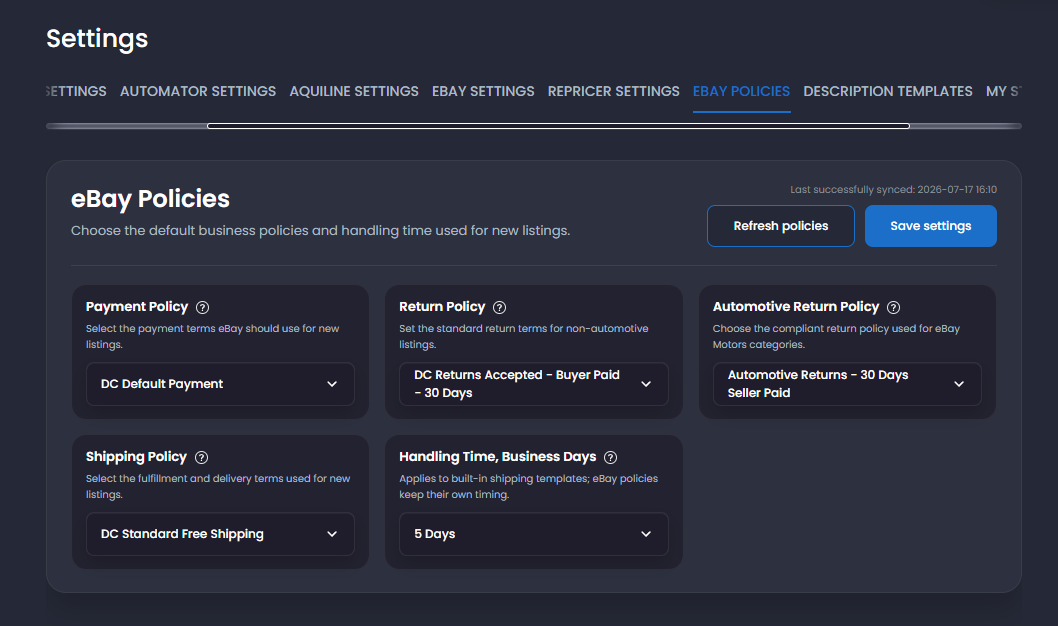
You can review or customize the policies directly on eBay later. Refresh again afterward so Dropship Calendar displays the latest versions.
Select and save
Section titled “Select and save”Choose one available policy for each required type:
- Payment.
- Return.
- Shipping or fulfillment.
Then save. New listings and Automator actions use the policy selections saved here.
Reconnect behavior
Section titled “Reconnect behavior”Reconnecting the same seller preserves that seller’s selections. A different seller has isolated policy and selection state. Never assume the previous seller’s policy names or IDs carry over.
Common problems
Section titled “Common problems”eBay Business Policies are not enabled
Section titled “eBay Business Policies are not enabled”Follow the setup message shown by Dropship Calendar. If eBay requires a seller action, complete it on eBay and choose Try again.
A selected policy disappeared
Section titled “A selected policy disappeared”The policy may be unavailable or changed on eBay. Refresh, select a current policy, save, and test one listing.
Refresh failed
Section titled “Refresh failed”The previous complete policy set should remain available. Do not repeatedly save an incomplete state. Confirm eBay authorization and try one refresh later.
Listing says to refresh policies
Section titled “Listing says to refresh policies”The listing could not confirm its saved policies against the current connected seller. Refresh and save all three selections, then retry only that listing.