
Manage your eBay listings
App guide · My Products
Keep your listings under control
Section titled “Keep your listings under control”My Products is the home for products you have posted to eBay.
It brings each product’s availability, estimated profit, listing status, supplier information, and available actions into one place. This makes it easier to manage a growing catalog without opening every listing individually on eBay.
Whenever possible, make listing changes through Dropship Calendar so your saved product information and monitoring remain aligned with eBay.
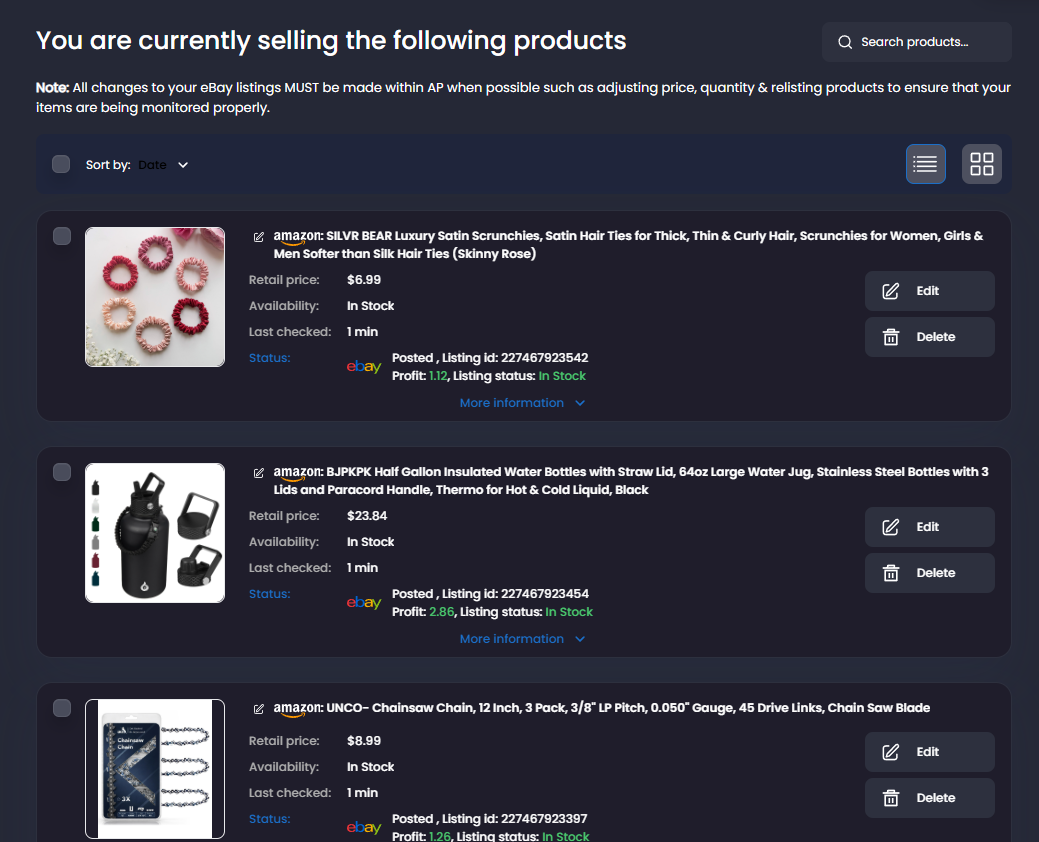
Find the listing you need
Section titled “Find the listing you need”Use search, filters, and sorting to narrow your products. You can also switch between list and grid views.
Each product shows useful information such as:
- Supplier price and availability.
- Estimated profit.
- When the supplier product was last checked.
- The status of its eBay listing.
- Actions for editing or removing the product.
Refresh photos, title and item specifics from Amazon
Section titled “Refresh photos, title and item specifics from Amazon”For an active Amazon-sourced eBay listing, open Edit and select Refresh photos, title & specifics. This uses current Amazon information to update the listing’s photos, title and supported item specifics. It does not refresh price or availability, change quantity or policies, or resume a paused listing. Description prose is preserved; recognizable template title and image content is updated.
Save unsaved changes with Revise, or close and reopen the editor to discard them before refreshing. The refresh is a separate action and does not submit your other editor changes.
After Content refresh queued appears, the editor closes. You can continue using the app while it processes. Conflicting actions for this listing remain unavailable until processing finishes. A later notification reports completion or a useful failure message. If queueing fails, the editor stays open.
Supplier details can update even if eBay rejects the revision. Products linked to the same supplier record may show those fresh supplier details, but their eBay listings are not automatically revised. The supplier’s Last checked time still refers to its price and availability check.
If the description layout cannot be refreshed safely, use normal Revise to review its title and images. If a refresh remains interrupted or awaits reconciliation, contact support.
Edit a listing
Section titled “Edit a listing”- Open My Products.
- Find the product you want to change.
- Select Edit.
- Review or update the available product and listing details.
- Save your changes.
- Check the live eBay listing to confirm the update.
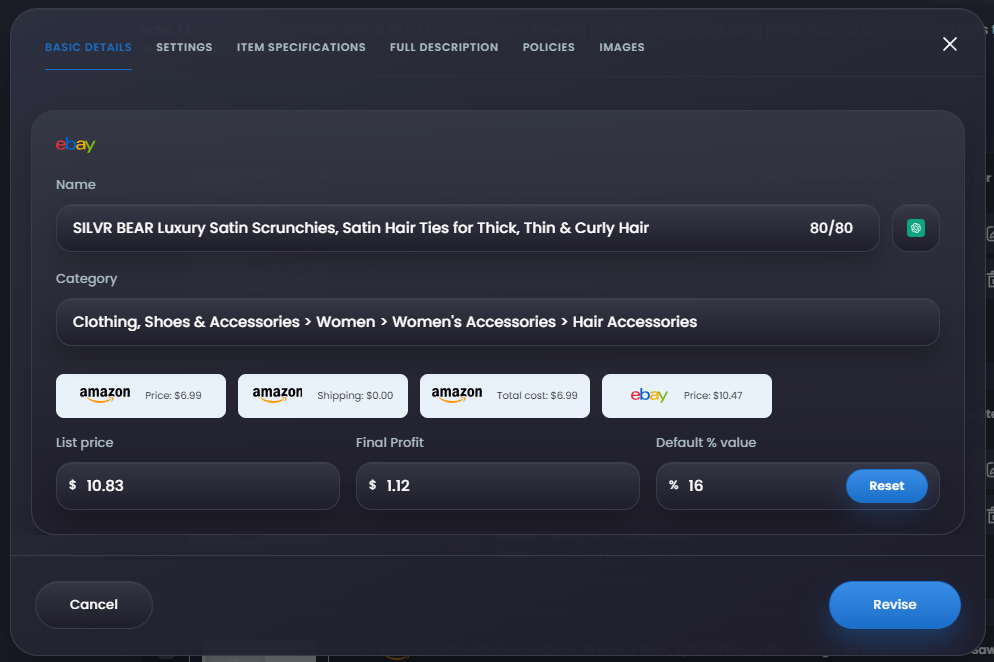
Depending on the product, you may be able to update its:
- Price or profit.
- Quantity.
- Supplier link.
- Title and description.
- Images.
- Item specifics.
- eBay policies and other listing settings.
Editing a product updates its existing eBay listing. It does not create another listing.
Change the supplier product
Section titled “Change the supplier product”Only change the supplier link when the replacement is the same product and variation.
Before saving the new link, confirm that the replacement has the same:
- Product and variation.
- Size, color, quantity, or pack count.
- Condition.
- Images and description.
- Shipping expectations.
After changing the supplier, review the new supplier price, availability, estimated profit, and live eBay listing.
Update multiple listings
Section titled “Update multiple listings”Select multiple products when you want to apply the same action to all of them. Open Bulk Actions to:
- Revise selected using the product information currently saved in Dropship Calendar.
- Apply account pricing rules using your saved profit settings.
- Change quantity for the selected listings.
- Delete selected listings you no longer want to sell.
Check the selected-product count before continuing. Selecting everything currently shown may not include products on other pages.
Keep pricing and availability current
Section titled “Keep pricing and availability current”When your monitoring features are enabled, Dropship Calendar can check supplier prices and availability and apply your saved settings automatically.
My Products shows the latest availability, profit, listing status, and last-checked information for each product. You do not need to update every listing manually.
See Repricer and Volume Checker to understand how automatic price and availability changes work.
Remove a listing
Section titled “Remove a listing”Use Delete when you no longer want to sell a product. Choose the connected eBay store from which the listing should be removed, then confirm the action.
Enable Remove and block only when you also want to prevent the supplier product from being added again later.
- Remove ends the selected eBay listing.
- Remove and block ends the listing and adds the supplier product to Blocked Products.
If eBay cannot remove the listing, it may remain live. Check the product status and the listing on eBay before trying again.
Automatic removal after an eBay policy violation
Section titled “Automatic removal after an eBay policy violation”When eBay reports a policy violation, Dropship Calendar matches the exact listing, blocks the Amazon product, and tries to end the listing. The product may be archived because Dropship Calendar ended it or because eBay had already removed or hidden it.
Open Notifications with the Listings filter to see the recorded outcome. Then open Blocked Products to see the policy name and permanent policy block. If removal could not be confirmed, check the listing directly on eBay and contact support before taking another action.
Learn more about eBay Policy Protection.
Review product performance
Section titled “Review product performance”Use Products statistics to review listing activity and find products with or without views.
Statistics can change as new eBay activity is received. Refresh the page before using an older count to select or remove a large group of products.