
Blocked Products
App guide · Product safety
Blocked Products is your do-not-add list. Use it when you remove a product sourced from Amazon and do not want Dropship Calendar to suggest or prepare that product for listing again.
Block a product when removing it
Section titled “Block a product when removing it”- Open My Products.
- Select the products you want to remove.
- Choose Remove.
- Turn on Remove and block.
- Confirm the removal.
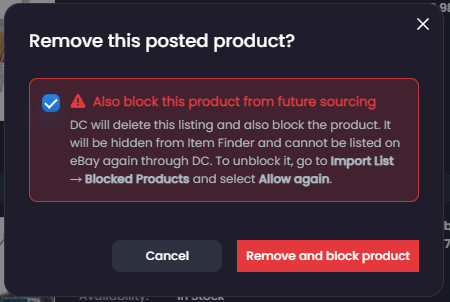
The option is turned off by default. If you remove a product without selecting Remove and block, the product may appear again later.
View your blocked products
Section titled “View your blocked products”Open Import List → Blocked Products to see the products you have blocked.
From this page, you can:
- Search for a blocked product.
- Select one or more products.
- Choose Allow again when you no longer want them blocked.
Each card says who created the block:
- Blocked by: You means you chose Remove and block. You can select Allow again.
- Blocked by: eBay policy violation means eBay reported a policy problem. The policy may also be shown, and Allow again is not available.
Allow a product again
Section titled “Allow a product again”Select the product and choose Allow again.
Only products marked Blocked by: You can be allowed again. An eBay policy block stays in place so the same product cannot be posted again after a policy violation.
This removes the product from your do-not-add list. It does not restore the previous eBay listing or automatically add the product to Import List.
When you are ready, you can find the product again through Item Finder. It must still pass Dropship Calendar’s normal product-safety checks.
What blocking affects
Section titled “What blocking affects”Blocking prevents the product from being added through future product-finding and listing workflows. It does not cancel existing orders or change an eBay listing that is still live.
When eBay reports a policy violation, Dropship Calendar separately tries to remove or archive the exact listing. See eBay Policy Protection for the possible outcomes.