
Automator
App guide · Item Finder
Add qualifying products without reviewing them one by one
Section titled “Add qualifying products without reviewing them one by one”Automator reviews the products found in the eBay store you are viewing and adds products that match your criteria to Import List.
Choose how many products you want. Automator handles the selection, allowing you to build your Import List in a few clicks.
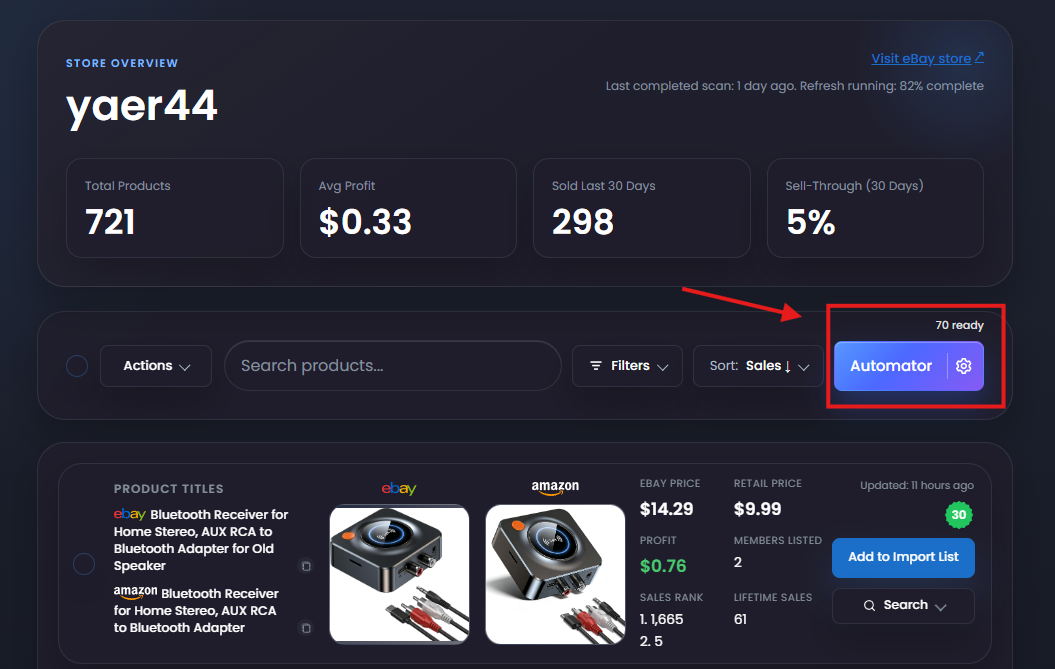
Two ways to use Automator
Section titled “Two ways to use Automator”Quick add with your saved criteria
Section titled “Quick add with your saved criteria”The number above Automator shows how many products currently match your saved criteria.
Select Automator to add the requested number of qualifying products directly to Import List.
If you have not configured your criteria yet, set up Automator first.
Choose criteria for one run
Section titled “Choose criteria for one run”- Select the gear icon beside Automator.
- Choose the quantity, supplier price range, minimum profit, minimum sales, and optional member limit for this run.
- Select Add products.
The choices in the gear window apply to that run. To change the criteria used by the main Automator button, update your Automator settings.
If fewer products are added
Section titled “If fewer products are added”Automator only adds products that match your criteria and are currently available to add. If fewer products qualify than the number requested, it adds the products it can find.
Review your products
Section titled “Review your products”Open Import List after Automator finishes. Review the products and their listing details before posting them to eBay.
Start with a quantity small enough to review before increasing Automator’s scope.