
Handle an item not received request
App guide · Resolution Center
What “item not received” means
Section titled “What “item not received” means”An item not received request means the buyer told eBay that the package has not arrived. eBay may call the open request an inquiry. If eBay is later asked to decide, it becomes a case.
The request does not automatically cancel the eBay order or a supplier order.
For the recommended response, evidence, and escalation sequence, see How to Handle Item Not Received Cases.
Before you choose an action
Section titled “Before you choose an action”- Open Resolution Center, select Item not received, and open the request.
- Read the latest buyer and seller messages.
- Check the response deadline and the current eBay status.
- Review the supplier order, delivery progress, tracking number, carrier, and ship date.
- Choose one action and read its confirmation before sending it.
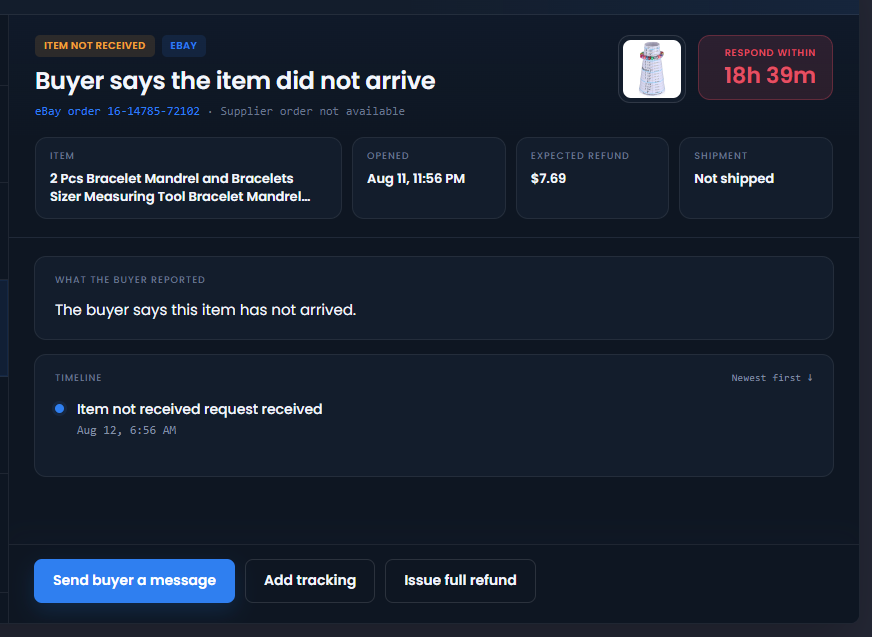
Send the buyer a message
Section titled “Send the buyer a message”Use Send buyer a message when you need to ask a delivery question or share a helpful update. The confirmation shows the exact text that will be sent. Messages are plain text.
Add tracking
Section titled “Add tracking”Use Add tracking to send the request’s tracking number, carrier, and ship date to eBay. Review all three fields in the confirmation. Adding tracking does not guarantee that eBay will close the request.
If Aquiline tracking is pending, wait until eBay accepts that upload before sending another tracking update.
Issue a full refund
Section titled “Issue a full refund”Use Issue full refund only when you intend to refund the full amount shown. This action does not cancel or refund the Amazon or other supplier purchase. Review that purchase separately.
When eBay accepts the full refund, the item not received request closes automatically. You do not need to close the request separately.
A completed refund marks the sale Refunded, not Canceled, in Dropship Calendar. A pending refund stays in progress until eBay confirms the result.
Ask eBay to step in
Section titled “Ask eBay to step in”Use Ask eBay to step in when the action is available and you want eBay to review the request. The confirmation asks for a reason and short case details. It cannot attach a file or photo.
The button becomes available three hours after the displayed response deadline, while the request is open and waiting for the seller and no other action is being verified. The page checks availability when that time arrives. eBay checks again when you submit and may say the action is not available yet.
After eBay accepts the request, the status changes to eBay is reviewing. Dropship Calendar checks eBay for review, hold, decision, and closure updates and keeps the request current.
If Amazon shows a delivery photo
Section titled “If Amazon shows a delivery photo”Dropship Calendar does not check for Amazon delivery photos. Open the supplier order on Amazon and check whether it is marked delivered and includes a photo.
If a photo is available, send the buyer a message through eBay Messages and attach it. This can strengthen your delivery evidence if eBay reviews the request.
What “Submitted — verifying” means
Section titled “What “Submitted — verifying” means”This status means eBay received an attempt and Dropship Calendar is checking the result. The check can take a few minutes. Do not click the action again or repeat it directly on eBay while the result is being checked.
If eBay clearly rejects an action, the confirmation stays open and shows a safe explanation. Review the latest request and correct the information before trying again.
When you ask eBay to step in, Escalation sent — confirming means eBay accepted the escalation and we are checking for the case. Escalation confirmation pending means confirmation is still unavailable. These statuses replace the overdue timer with the next scheduled check, shown in your local time. A check becoming due does not mean it has finished processing. If no check is scheduled, the request says Confirmation needs attention — no check scheduled; contact support rather than sending another escalation.
After we confirm the case is open, the status becomes eBay review, or On hold when eBay reports a hold. The selected request and its list entry update together. Closed cases move to View closed with their outcome. The original response deadline remains in the details for reference.
If the request changes or closes on eBay
Section titled “If the request changes or closes on eBay”The buyer may send another message, withdraw the request, or eBay may update the review. Resolution Center keeps the conversation and timeline current. A later safety check also recovers recent requests that did not arrive immediately.
Closed requests remain available under View closed, including a request first discovered after it had already closed.
What changes in My Orders and Dashboard
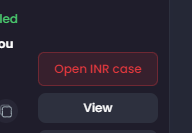
Section titled “What changes in My Orders and Dashboard”My Orders links back to the request. Select Open INR case on the affected order to return to it.
Open or reviewed cases do not cancel the order and do not remove the sale from Dashboard totals. Only a confirmed, completed full refund changes the sale to the refunded result. The My Orders card then shows Refunded, and the sale is excluded from Dashboard sales, revenue, and profit totals. A reversed refund restores the sale to those totals.
Get help safely
Section titled “Get help safely”If you need support, share the eBay order number, the request status, and the safe error text shown in Resolution Center. Never share your eBay password, access token, buyer address, or private message history in a public screenshot.
Continue
Section titled “Continue”Closed case outcomes
Section titled “Closed case outcomes”Closed cases show your outcome and the buyer’s outcome separately, including You won · Buyer won when eBay reports wins for both parties. A missing result is shown as unavailable, not as a loss. Confirming outcome means the inquiry has closed and we are still collecting the final case details. The next outcome check appears in your local time. Outcome verification unavailable means the checks could not complete; contact support instead of submitting another escalation.
Seller fault: Not reported means we do not have a supported fault determination from eBay. Winning or losing a case is not automatically translated into fault, a completed refund, or who paid for a refund. Those are separate facts.