
Handle an eBay cancellation request
App guide · Resolution Center
What a cancellation request means
Section titled “What a cancellation request means”An eBay buyer cancellation request means the buyer has asked to cancel an order. It is different from starting a seller cancellation yourself.
This is also different from an item not received request, where the buyer says a package has not arrived and the order is not automatically marked canceled.
Review the request as soon as possible. Check whether the supplier order was already placed and whether tracking is available before choosing an action.
Dropship Calendar does not automatically cancel an order with your supplier.
Before you choose
Section titled “Before you choose”- Open Resolution Center, select Cancel requests, and open the request.
- Read the buyer’s reason and the response deadline.
- Open the matching order information.
- Check whether the supplier order was placed.
- Check whether the package shipped and whether tracking was uploaded to eBay.
Accept the cancellation
Section titled “Accept the cancellation”Choose Accept cancellation when you agree to the buyer’s request.
- Select Accept cancellation.
- Read the confirmation message.
- Select Accept cancellation again to send the choice to eBay.
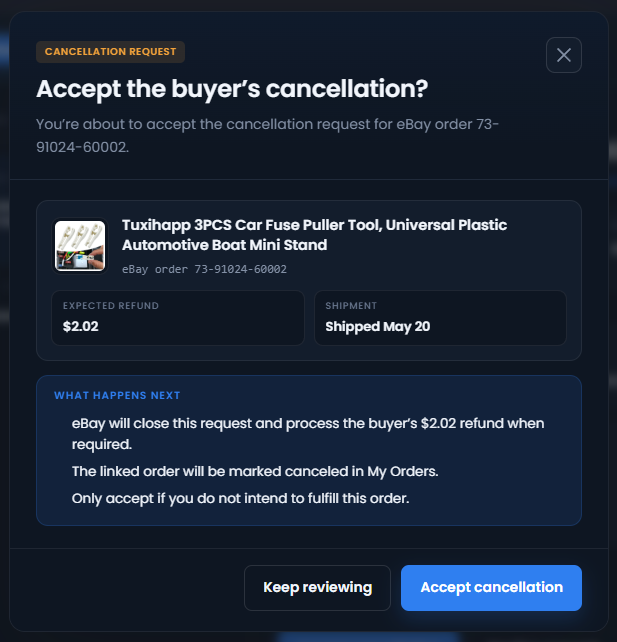
After eBay accepts the choice, the request shows Closed. eBay processes the buyer’s refund when its cancellation flow requires one.
The linked order is also marked Canceled in My Orders. Canceled orders are excluded from the Dashboard sales, revenue, and profit calculations that omit canceled sales.
Accepting the buyer’s request does not cancel a supplier order. If a supplier order exists, review it separately.
Decline the cancellation
Section titled “Decline the cancellation”Choose Decline request when the order should continue, such as when it has already shipped.
Dropship Calendar fills in the tracking number and shipment date already saved for the order when they are available. Review them before continuing. You may correct those shipping details or leave them blank if tracking is not available yet. Dropship Calendar never asks you for a cancellation ID.
- Select Decline request.
- Review the tracking number and shipping date. Correct them if needed.
- Read the confirmation message.
- Select Decline request again to send the choice to eBay.
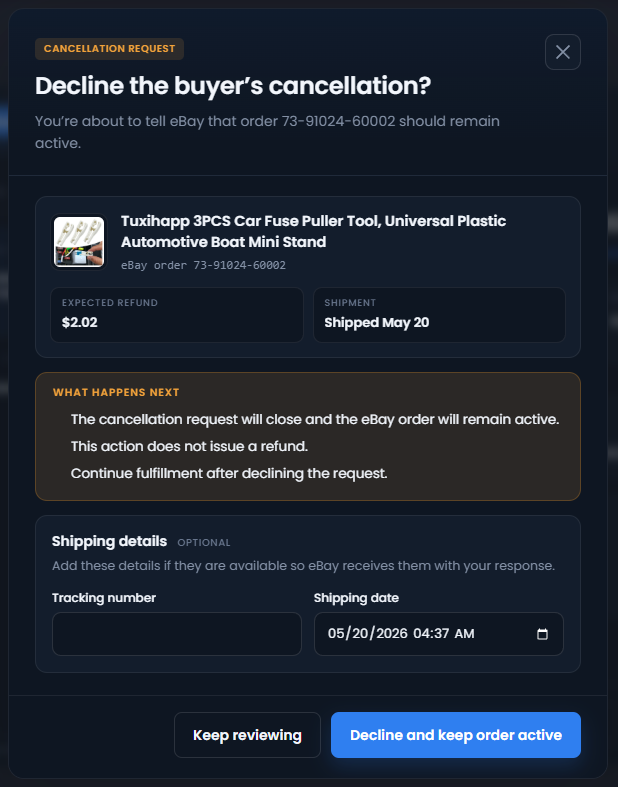
After eBay accepts the choice, the request shows Closed.
Create Aquiline tracking instead
Section titled “Create Aquiline tracking instead”Some eligible Amazon orders show Create Aquiline tracking. Use it when the order should continue and valid supplier tracking is not available yet.
The action is available only when the Amazon order is in Dropship Calendar’s managed tracking flow, was recorded as purchased at least one day ago, and does not already have a carrier, tracking number, or Aquiline number. If the order is eligible but Aquiline is turned off or you do not have one credit, the button is unavailable. Hover over or focus the button to see the reason.
- Select Create Aquiline tracking.
- Read the confirmation. Creating the number uses one Aquiline credit.
- Select Create Aquiline tracking again.
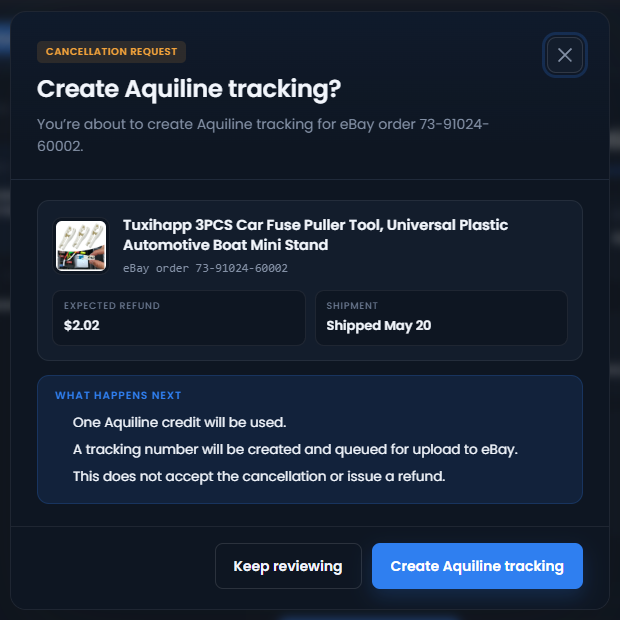
Dropship Calendar creates the Aquiline number and queues it for upload to eBay. This action does not accept the cancellation and does not issue a refund.
While that upload is pending, Accept cancellation and Decline request are unavailable. Do not try to submit another cancellation choice during this time. When eBay accepts the tracking upload, the request shows Tracking uploaded — cancellation closed.
If the tracking upload fails, the cancellation is not treated as accepted or declined. Review the tracking result in My Orders and return to the open request before deciding what to do next.
When you use Refund Method
Section titled “When you use Refund Method”If an unfulfilled order has an open cancellation request, you can still start Refund Method from My Orders when the order otherwise qualifies.
While Refund Method is processing the order, Accept cancellation, Decline request, and Create Aquiline tracking are unavailable. This prevents two different actions from being sent to eBay for the same order.
When eBay accepts the tracking uploaded by Refund Method, the request immediately shows Tracking uploaded — cancellation closed. After eBay confirms the refund, it shows Refund confirmed — cancellation closed. Dropship Calendar checks the order again later and confirms the closed request from eBay’s order status.
Do not separately accept or decline the request on eBay while Refund Method is processing it.
When tracking is uploaded
Section titled “When tracking is uploaded”Tracking is the carrier number used to follow a shipped package.
Tracking continues normally while a buyer cancellation request is open. Dropship Calendar does not pause Auto Ordering or tracking because of the request.
When Dropship Calendar successfully uploads tracking to eBay, the request immediately shows:
Tracking uploaded — cancellation closed
This is an immediate local update based on eBay accepting the tracking upload. Dropship Calendar checks eBay again later and quietly confirms or corrects the request status.
Tracking added outside Dropship Calendar
Section titled “Tracking added outside Dropship Calendar”If you or another tracking service uploads tracking directly to eBay, Dropship Calendar does not see that upload immediately. The cancellation may appear open until the next eBay order check.
Do not upload made-up tracking or reuse tracking from another order just to close a cancellation.
If an update cannot be confirmed
Section titled “If an update cannot be confirmed”If the page says the update is being checked, do not submit the same action again. eBay may already have received it. Dropship Calendar will check the request before another action is allowed.
If eBay clearly rejects the choice, read the message, review the current order and tracking details, and try again only after correcting the problem.