
My Orders
App guide · Orders and fulfillment
Keep every order moving
Section titled “Keep every order moving”My Orders gives you one place to follow every eBay sale from the moment it arrives until it is fulfilled, tracked, canceled, or refunded.
The goal is simple: show you what has happened, what is happening now, and what needs your attention.
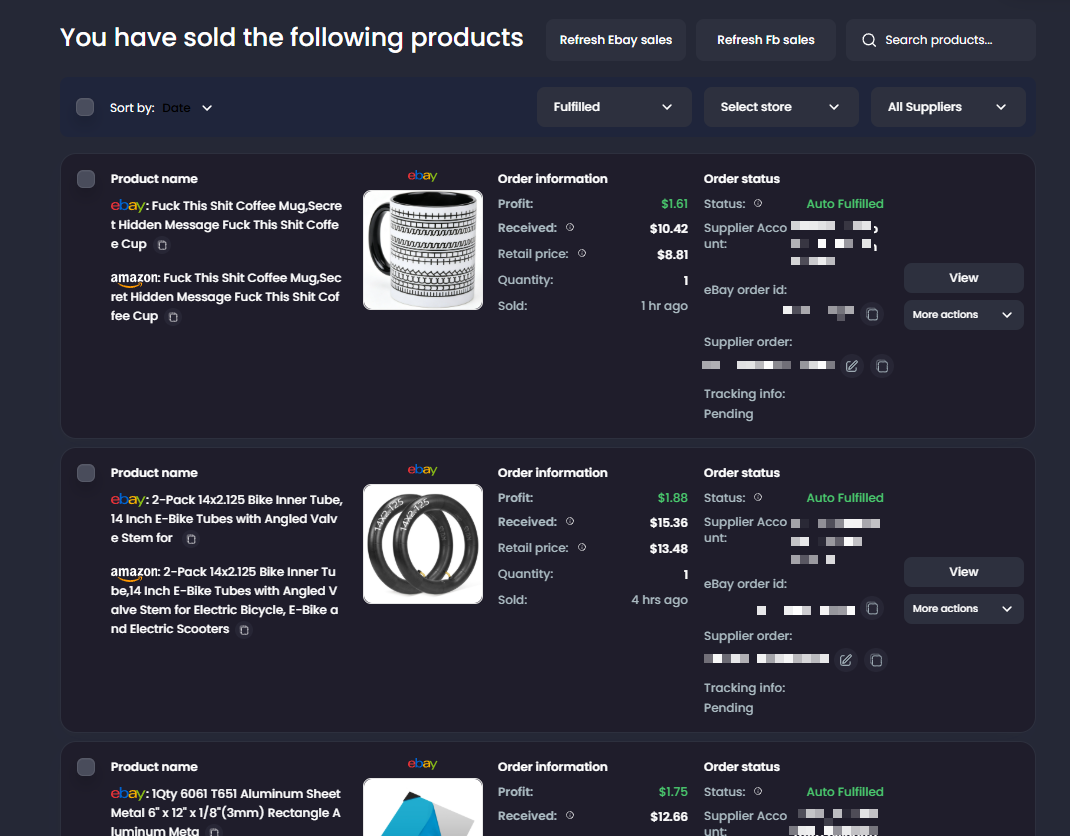
Each order can show:
- The product and quantity sold.
- The connected eBay store.
- Buyer and shipping information.
- Supplier information and order number.
- The amount paid to the supplier.
- Estimated profit.
- Fulfillment and tracking status.
- Actions available for that order.
- A link to an open or recently closed cancellation or item not received request.
New-order profit may be temporary. eBay does not always provide the final net received amount immediately after a sale. Until it is available, My Orders may show an estimated profit that is not yet final. Dropship Calendar updates the profit automatically once eBay’s net received amount is synced. This usually happens within about 10 minutes, but eBay can occasionally take a few hours to make the amount available.
Find the order you need
Section titled “Find the order you need”Use search, store, supplier, and fulfillment filters to narrow your orders. You can also sort orders by date or profit.
Open an order before taking action so you can review its latest status, supplier details, and tracking information.
Understand the order status
Section titled “Understand the order status”| Status | What it means | What to do |
|---|---|---|
| New or Not Fulfilled | The sale has been received, but the supplier order has not been completed. | Confirm that Auto Ordering is working or fulfill the order manually. |
| Processing | Dropship Calendar is currently working on the order. | Wait for the current attempt to finish. Do not place a second supplier order. |
| Needs Attention or Failed | Something prevented the order from moving forward. | Read the current message, correct the problem, and retry only when appropriate. |
| Fulfilled | The supplier order was placed or the order was marked as fulfilled. | Confirm the supplier order number and total amount paid. |
| Tracking Available | Tracking has been received or added. | Confirm that the carrier and tracking number were uploaded to eBay. |
| Canceled | The eBay order was canceled or marked as canceled. | Check whether a supplier order also needs to be canceled. |
| Refunding or Refunded | A refund is in progress or has been completed. | Use Refund status to follow its progress and confirm the result on eBay. |
The exact wording may differ depending on how the order was fulfilled. The current status and message on the order should guide your next action.
When an order is processing
Section titled “When an order is processing”Some temporary supplier or connection problems can be tried again automatically.
If an order is processing or waiting to retry, let that attempt finish before placing the supplier order yourself. Otherwise, the same customer order could be purchased twice.
Refresh the order later to see its latest status.
If an order needs attention
Section titled “If an order needs attention”- Read the current order status and message.
- Check the supplier product’s price and availability.
- Confirm that the correct supplier account is available.
- Check payment, shipping address, and delivery information.
- Correct the problem before trying again.
Use Force retry only when you understand why the previous attempt stopped. Force retry may ignore the delivery-day limit for that attempt, but it cannot fix account, payment, product, or eBay problems.
Fulfill an order manually
Section titled “Fulfill an order manually”Use manual fulfillment when you have already placed the supplier order yourself or intentionally used a different supplier.
Enter the requested supplier order information and the total amount paid so Dropship Calendar can keep the order and profit records accurate.
Do not mark an order as fulfilled until the supplier order has actually been placed.
See Fulfill and track orders for the complete process.
Keep the supplier cost accurate
Section titled “Keep the supplier cost accurate”If the amount paid to the supplier differs from the amount shown, use Edit supplier cost.
Enter the complete amount paid for that order. Updating the supplier cost corrects the recorded profit without changing the order’s tracking information.
Add or review tracking
Section titled “Add or review tracking”When tracking becomes available, confirm that the carrier and tracking number are correct.
If you fulfilled the order manually, use the available tracking action to add the tracking number. Then verify that it was accepted by eBay.
If eBay rejects a tracking number because it was used before, upload a different valid tracking number.
For an eligible Amazon order, the actions menu may show Create Aquiline tracking before supplier tracking is available. Creating the number uses one Aquiline credit and queues it for upload to eBay. See Aquiline tracking settings for the order, setting, and credit requirements.
Cancel or refund an order carefully
Section titled “Cancel or refund an order carefully”If an order shows Cancel request or Open INR case, open it in Resolution Center. When an order has more than one request, choose View requests to review them. Resolution Center shows the request type, deadline, history, and available actions.
Canceling or refunding an order on eBay does not always cancel an existing supplier order.
When eBay successfully accepts a buyer cancellation through Resolution Center, Dropship Calendar marks the linked My Orders record Canceled. The canceled sale is then excluded from Dashboard sales, revenue, and profit calculations that omit canceled orders. This does not cancel an Amazon or other supplier order; review that purchase separately.
An item not received request does not mark the order Canceled. A confirmed full refund changes the sales result to Refunded and removes it from Dashboard sales totals. A pending refund or an eBay review does not remove the sale. If eBay reverses the refund, the sale is included again.
Before continuing:
- Check the current eBay order status.
- Confirm whether the supplier order has already been placed.
- Review its shipping and tracking progress.
- Confirm the cancellation or refund reason.
- Verify the result on eBay and with the supplier.
If a refund is already in progress, use Refund status instead of starting the action again.