
Amazon TBA tracking with Aquiline
App guide · Orders and fulfillment
What Aquiline does
Section titled “What Aquiline does”Amazon may provide a tracking number that begins with TBA when it delivers a package through Amazon Logistics. A TBA number is not standard carrier tracking, so it may not be useful on eBay in its original form.
Aquiline converts eligible Amazon tracking into tracking that can be shared with eBay. Once it is enabled, Dropship Calendar handles matching Amazon orders automatically.
Recommended setting
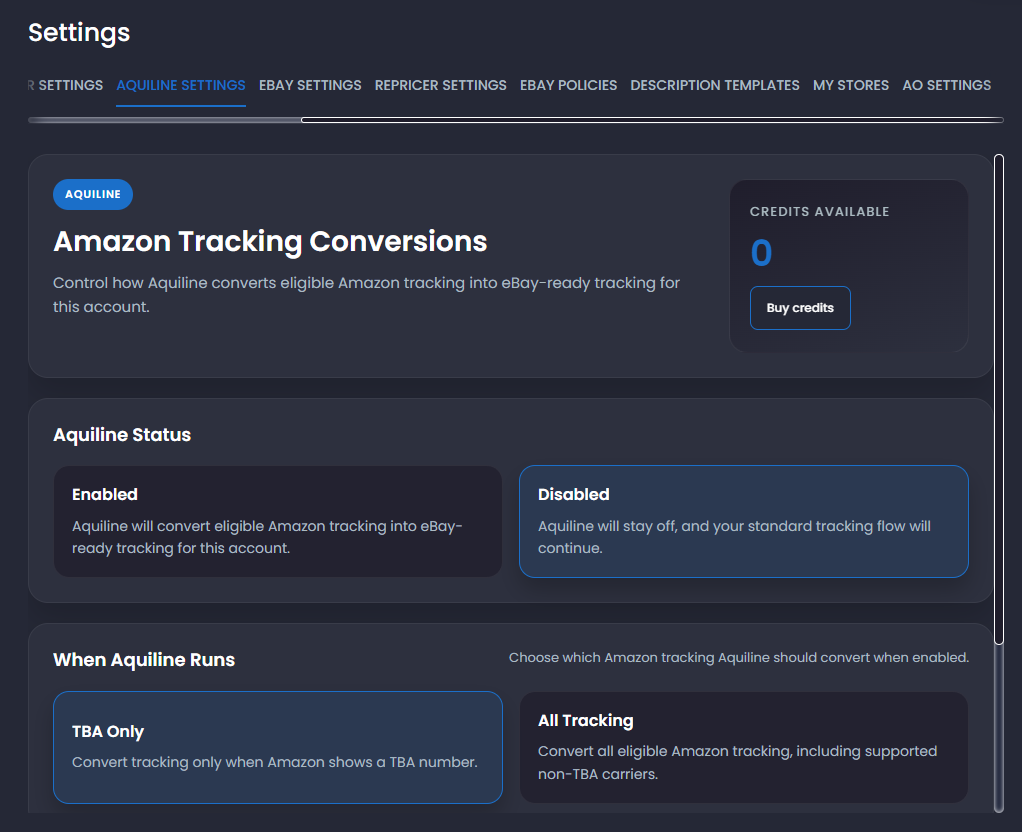
Section titled “Recommended setting”Open Settings → Aquiline Settings, select Enabled, and choose when Aquiline should run.
| Setting | What it does |
|---|---|
| TBA Only | Converts tracking only when Amazon provides a TBA number. Recommended for most users. |
| All Tracking | Converts TBA numbers and other supported Amazon tracking. |
| Disabled | Turns off Aquiline. The standard tracking process continues without Aquiline conversion. |
Select Save settings after making a change.
What to expect after an Amazon order
Section titled “What to expect after an Amazon order”When Auto Ordering places an Amazon order—or you manually record its correct Amazon order ID and Amazon account—Dropship Calendar begins checking for tracking.
- Amazon prepares and ships the order.
- Dropship Calendar checks Amazon periodically for tracking.
- Until Amazon releases tracking, the order may continue to show that tracking is pending.
- When tracking appears, Aquiline checks whether it matches your setting.
- If the tracking is eligible, Aquiline converts it and Dropship Calendar attempts to send it to eBay.
This is not immediate. Amazon may not provide a TBA or other tracking number until the order ships. You normally do not need to refresh the order repeatedly or enter Amazon tracking yourself.
If Aquiline tracking is being created or uploaded, wait for that process to finish. A number shown in Dropship Calendar does not by itself mean that eBay accepted the upload.
How credits work
Section titled “How credits work”Each successful Aquiline conversion uses one credit. Your available balance appears on the Aquiline Settings page.
If you have no credits, Aquiline will not run on new eligible tracking. Select Buy credits to add more. After credits are added, eligible blocked shipments can resume automatically.
Create Aquiline tracking manually
Section titled “Create Aquiline tracking manually”Some orders show Create Aquiline tracking in My Orders or beside an open buyer cancellation request in Resolution Center. Use this only when valid supplier tracking is not available yet.
The action appears only when the order:
- Is an eligible eBay order for an Amazon product.
- Is in Dropship Calendar’s managed tracking flow.
- Was recorded as purchased at least one day ago.
- Does not already have a carrier, tracking number, or Aquiline number.
Creating the number uses one Aquiline credit and queues the tracking for upload to eBay. In Resolution Center, the confirmation explains that this does not accept the buyer’s cancellation or issue a refund.
If an eligible Resolution Center action is unavailable, hover over or focus it. The message tells you whether Aquiline must be enabled, whether you need a credit, or both. If the action is not shown at all, the order does not currently meet the order and tracking requirements.
If tracking remains pending
Section titled “If tracking remains pending”| What you see | What to do |
|---|---|
| Amazon has not provided tracking | Wait for Amazon to ship the order. Dropship Calendar will check again. |
| Aquiline is disabled | Open Aquiline Settings, enable it, select a tracking option, and save. |
| No credits are available | Add credits. Eligible blocked shipments can resume automatically. |
| Create Aquiline tracking is unavailable | Hover over or focus the action for the reason. If it is not shown, the order is not currently eligible. |
| Aquiline upload is pending | Wait for the upload result before trying another tracking action. |
For a manually placed Amazon order, also confirm that you recorded the correct Amazon order ID and selected the Amazon account used for the purchase. Dropship Calendar needs both to retrieve the right tracking.
Never invent a tracking number, reuse tracking from another order, or submit repeated tracking updates while an Aquiline upload is pending.
See Fulfill and track orders for the complete fulfillment process.