
Review a scanned eBay store
App guide · Item Finder
Open a scanned store
Section titled “Open a scanned store”When a store’s scan is Ready, select the store to review its statistics and matched products. If you have not added a store yet, start with Scan eBay stores.
Understand the store statistics
Section titled “Understand the store statistics”The cards at the top summarize the scanned store:
- Total Products shows the products from this store currently available to review in Item Finder.
- Average Profit shows the average estimated profit across the store’s matched products.
- Sold Last 30 Days shows the store’s recorded eBay sales during the previous 30 days.
- Sell-Through (30 Days) compares the store’s recent sales with its active eBay listings. A higher percentage means more of the store’s catalog produced sales recently.
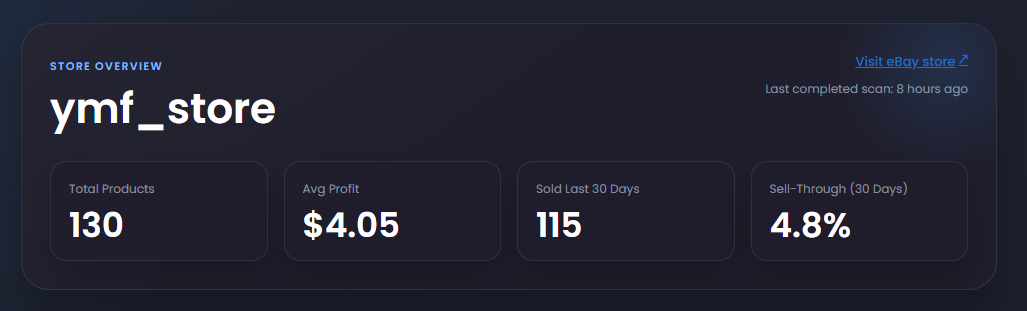
These statistics help you understand the store as a whole. They show historical performance and do not guarantee that every product will sell in your store.
Find the products you want to review
Section titled “Find the products you want to review”- Search finds products by title.
- Filters lets you choose a minimum and maximum retail price. Retail price is the current supplier price shown on the product card.
- Sort orders products by profit, retail price, or lifetime sales in ascending or descending order.
- Actions lets you add selected products to Import List.
To filter by retail price:
- Select Filters.
- Select Price filters.
- Enter a minimum price, maximum price, or both. Leave either field empty when you do not want a limit on that side.
- Select Apply filters.
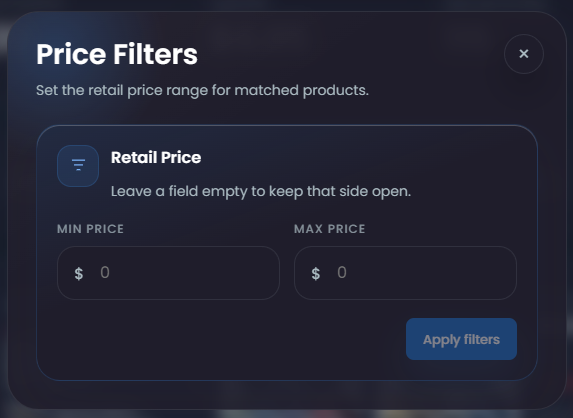
Minimum profit, minimum sales, and max members listed are criteria used by Automator settings. They are not filters on this page.
Understand the product card
Section titled “Understand the product card”Each product card brings the eBay listing and its matched supplier product together.
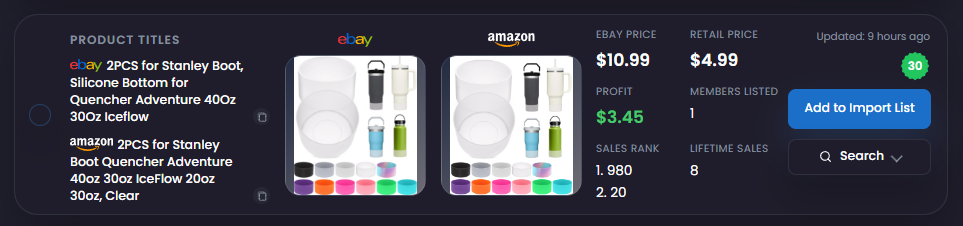
- eBay title and image show the product as it appears in the scanned eBay store.
- Supplier title and image show the matched supplier product.
- eBay Price shows the current price on the eBay listing.
- Retail Price shows the current supplier price.
- Profit shows the estimated profit using the available pricing information.
- Members Listed shows how many other Dropship Calendar members have the product listed.
- Sales Rank shows the supplier sales rank and category information available for the product.
- Lifetime Sales shows the recorded lifetime sales for the eBay listing.
- Sold 30d badge indicates that the product recorded sales during the last 30 days.
- Updated shows how recently the product information was refreshed.
- Add to Import List moves the product into the listing-preparation workflow.
Members Listed is an indicator, not a restriction. It only represents other Dropship Calendar members and does not include every competing seller on eBay.
Use the information together
Section titled “Use the information together”Store statistics and recorded sales show what has happened before, but they do not guarantee future sales. A low member count also does not mean there is no competition elsewhere on eBay.
Compare demand, supplier price, estimated profit, competition, availability, and the shipping promise before adding a product to Import List.